Project
A desktop IDE where the coding agent is a panel rather than a plugin — it proposes multi-file edits, drives git, indexes the codebase, and talks to whichever model I point it at.
What it is
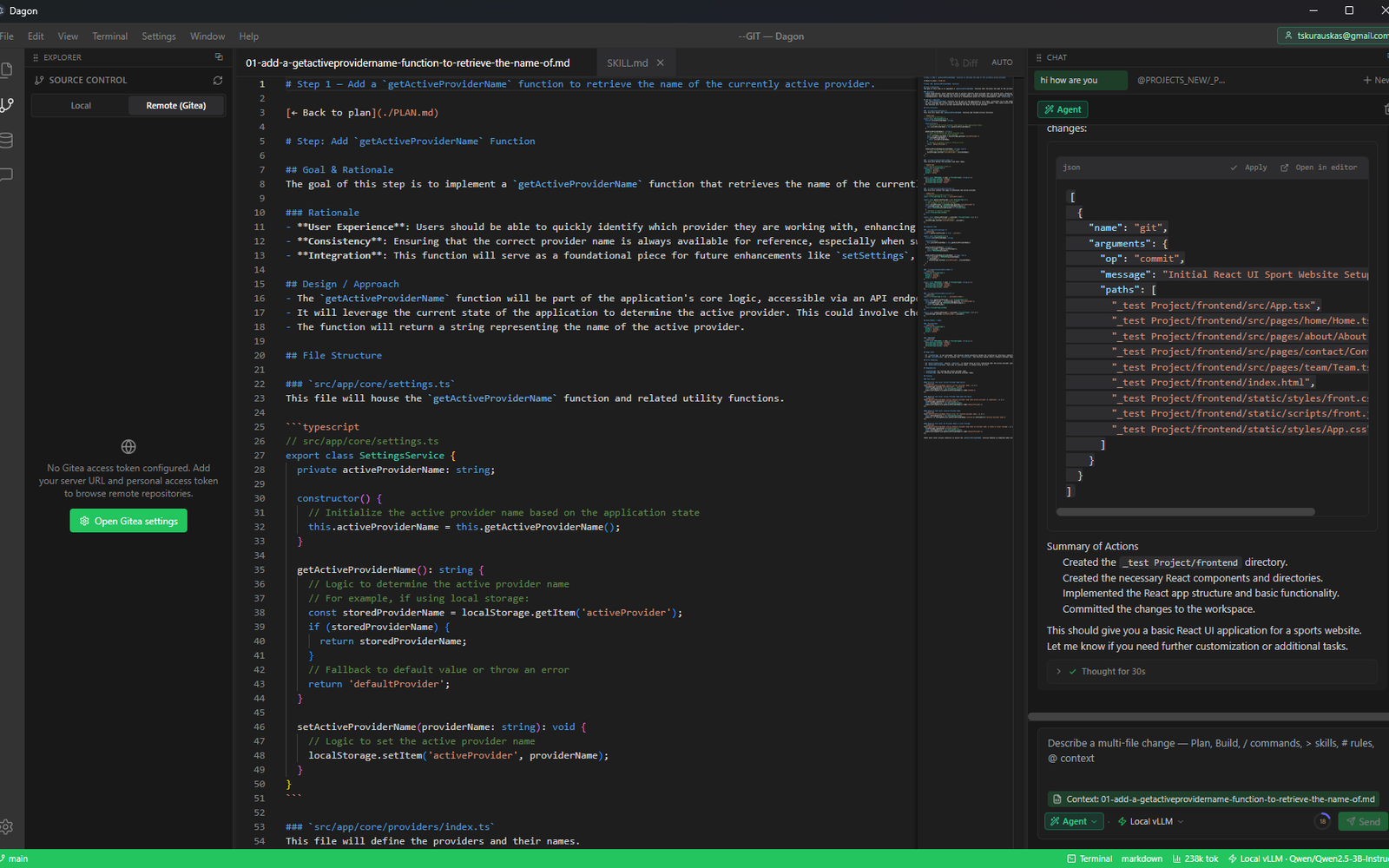
Dagon is the editor I use on my own repositories. Electron shell, React renderer, Monaco for editing, and a dockable layout — activity bar, resizable panels, command palette, fuzzy quick-open, workspace search. The file tree carries git status decorations; the editor has tabs, a toggleable minimap, a side-by-side diff view, and an inline AI edit on Ctrl/Cmd+K. Underneath is a real terminal: xterm.js over a node-pty process, multiple sessions, with a piped-shell fallback for when the native module has not been rebuilt. The distinguishing choice is that the model is configuration rather than architecture — every provider is reached over the same OpenAI-compatible interface, so a self-hosted gateway, a vLLM server on my own GPU box, an Ollama install, and a hosted frontier model are all just rows in a list. It is version 0.1.0 and it is a tool built for one user, not a product.
Six modes, one agent
The chat panel is not one thing. Chat is ordinary question-and-answer. Agent runs the tool loop. Plan produces a reviewable artifact — a numbered plan, versioned, written into the workspace as a PLAN.md plus a file per step, which you can execute or keep. Multitask fans work out across subagents, with a running-subagents bar and an activity feed showing what each is doing. Debug exposes the raw exchange. Remote drives an instance running somewhere else. Sessions are tabbed and concurrent, and each one carries its own message queue: type follow-ups while the agent is mid-turn and they line up behind it, editable or removable before their turn comes. The composer advertises its own grammar — slash commands, > for skills, # for rules, ? for memories, @ for context — parsed by one trigger layer. Slash commands are a registry rather than a switch statement, so a workspace can define its own as markdown files and they appear alongside the built-ins.
How edits actually land
The agent does not write to disk directly. It emits tool calls against a registry of roughly thirty JSON-schema tools — read, write, targeted string replacement, delete, grep, glob, semantic search, shell, lints, web search and fetch, notebook edits, todo tracking, subagent dispatch — and file changes arrive in a proposal panel with per-file Apply and Apply all. Git is a tool of its own with status, diff, add and commit ops, and a commit will not run without a message. There is one deliberate exception to the review gate: when a plan has already been approved and you tell it to execute, it applies its own proposal instead of asking twice. Not every model emits native tool calls, so a fallback parser recognises them when they arrive as plain text or bare JSON, executes them, and strips them out before the chat renders — which is what makes smaller local models usable here at all. The agent can also stop and ask a clarifying question with selectable options rather than guessing.
Knowing what the model can see
Context is measured, not estimated. The served context window is read from the model server itself — vLLM reports it per model — rather than hardcoded, and that real number drives a usage ring on the composer. The status bar keeps a separate counter of cumulative tokens for the session, which opens a usage panel; the two meters are deliberately not the same number, because conflating spend with headroom would tell you a comfortable lie about how close you are to the limit. Prompt assembly works to an explicit budget, trims history harder for small models, and runs a repeat-collapser because small local models sometimes loop. Context arrives from several directions: @-mentions, drag-and-drop of files or selections straight into the composer as chips, a local semantic index with on-disk embeddings and its own sidebar panel, workspace memories, skills stored as markdown in the workspace, and MCP servers — Dagon speaks JSON-RPC to stdio Model Context Protocol servers and exposes their tools and resources to the agent as if they were built in. There is also a browser panel the agent can drive: navigate, snapshot, click, type, read the console, screenshot.
Git, and then Gitea
Source control is two panels behind one tab strip. Local is the working tree — staged and unstaged sections, branches and remote branches, ahead and behind counts, stashes, commit history, push, pull, merge, cherry-pick. Remote talks to a self-hosted Gitea over its API: search repositories server-side, page through results, clone one into a folder, and read a repository's releases and wiki without leaving the editor. The access token for that is configured with a base URL, an insecure-TLS toggle and a test-connection button, and it is held in the Electron main process — the renderer only ever receives results. A token that never crosses into the window cannot be exfiltrated by anything rendered inside it, which matters more than usual in an app whose entire purpose is executing text a language model produced.
Sign-in, remote control, and staying inside the box
The app sits behind a login: Keycloak OIDC using authorization code with PKCE, the flow appropriate to a desktop client, with the refresh token sealed through Electron safeStorage into the OS keychain rather than left in a file. Once signed in it registers itself with a controller and heartbeats every thirty seconds, so a running instance shows up as an online IDE that can be reached remotely — a WebSocket control channel, a remote server, and screen sharing, with a Remote panel and a remote chat mode as the front end. That reach is exactly why the safety layer matters. The renderer runs with context isolation and reaches the system only through an explicit preload bridge. Filesystem IPC sits behind a path guard confining writes to the open workspace, so a proposed edit cannot wander into a home directory or an SSH config. Shell execution is a separate layer behind its own setting, off unless enabled.
Building and shipping it
State is a Zustand store, styling is Tailwind against a dark palette, chat renders through react-markdown with syntax highlighting, and code blocks get an open-in-editor button. Around seventy Vitest files cover the renderer with Testing Library and jsdom, and end-to-end scripts drive the real built Electron application with Playwright rather than a mocked window — the bugs worth catching here only appear once IPC is real. Packaging is electron-builder targeting an NSIS installer on Windows, an AppImage on Linux and a dmg on macOS, with electron-updater against a self-hosted feed and an in-app update banner; Windows, Linux and Android artifacts are what actually exist today. The same web build is wrapped by Capacitor into an APK, which is less useful than it sounds and mostly exists because the renderer was already a plain web app.
Building tooling for yourself?
Editor internals, agent loops, context budgets, and the plumbing that keeps a model from doing something stupid to your filesystem — happy to talk about any of it.